
If you ever spent ever spent an hour exporting files from one tool, uploading them into another, and rebuilding the same settings just to get a usable result, you already know the friction.
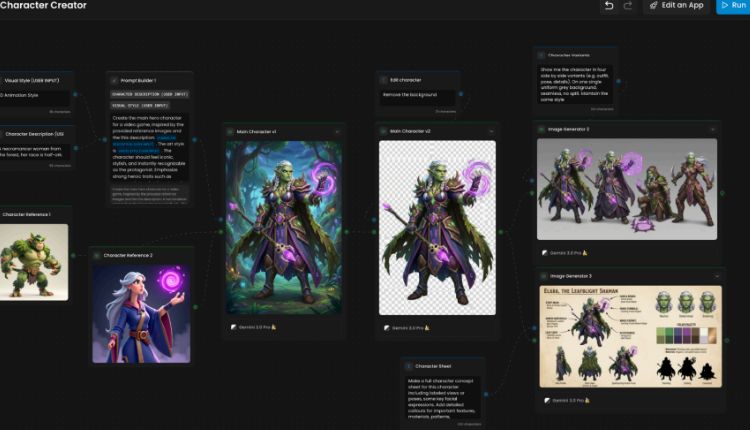
Scenario Workflows is designed to remove that break in the process. It’s a visual, node-based canvas where prompts, models, tools, and outputs exist inside a single connected pipeline.
Instead of juggling apps and recreating steps, you keep everything in one place and can run the same process again tomorrow with the same intent.
What are Scenario Workflows?
Scenario Workflows is a canvas where each node represents a stage in production: an input, a generation, an edit, or an output.
Rather than working through disconnected tasks, you assemble a pipeline once and reuse it. Settings stay tied to the asset. Teammates can see what happened, in what order, and why.
Why use workflows?
Workflows isn’t only a new interface. It’s a way to standardize asset creation so speed doesn’t reduce quality.
A visual, repeatable pipeline removes the “middle steps” teams constantly redo. It also removes guesswork: which model created this, which settings worked, and how the final result was produced. That transparency is what allows creative production to scale.
How a workflow works in practice
The interface is approachable the first time you open it, but flexible enough for production systems.
Each node has inputs on the left, outputs on the right, and detailed controls in the side panel. Connecting nodes defines how information moves through the pipeline.
While iterating, you can run a single node to test one step. When ready, you can execute the full workflow end-to-end.
The core building blocks
Workflows follows how real creative pipelines already function: start with inputs, generate, then refine.
Inputs
Text, images, video, 3D models, or audio, depending on what you’re creating.
Generators
Nodes that create new assets. Scenario supports image, video, 3D, and audio generation directly inside workflows.
Utilities
Where production quality comes in. This includes upscaling, background removal,
post-processing, and structural tools like Prompt Builder, Group Assets, and conditional branching (if-else logic).
The fastest way to start: Platform Workflows
If you want immediate results, begin with Platform Workflows. These are pre-built pipelines created by Scenario that you can run instantly, then duplicate and customize.
The process is simple:
Pick a workflow that matches your goal, insert your inputs, run it, then duplicate it and adjust only what matters.
They’re organized by category and complexity, so you can find quick wins or more advanced systems depending on your needs.
When to build Custom Workflows
Once your team knows what it consistently produces, that’s the right time to build a Custom Workflow.
Custom Workflows are ideal when you want a pipeline aligned to your brand or studio, when combining multiple models and tools, or when teammates need consistent results without rebuilding steps every time.
A good first workflow is simply a Text node connected to an Image Generator node. From there, add the steps you already do manually, such as upscaling, background removal, or turning an image into video.
Learn more in our Knowledge Base: https://help.scenario.com/en/articles/custom-workflows
From workflows to one-click tools: Workflows → Apps
When a workflow becomes stable, you can convert it into an App so others can run it without editing nodes.
Workflows to Apps lets you choose which nodes become user inputs, then publishes a simplified interface powered by the underlying workflow.
This turns a pipeline only one person understands into a production tool the entire team can use.
Conclusion
Scenario Workflows moves teams from one-off generations to repeatable systems. Start with Platform Workflows to gain momentum.
Build Custom Workflows to control your pipeline.
Turn your best workflows into Apps to scale across a team.
Build your workflows: https://app.scenario.com/workflows
Frequently Asked Questions (FAQ)
What is Scenario Workflows?
A visual node-based editor that connects inputs, generation, editing tools, and outputs into a single production pipeline.
Do I need technical experience?
No. Many teams begin by running Platform Workflows, then duplicate and gradually modify them.
Platform vs Custom Workflows?
Platform Workflows are pre-built and ready to run. Custom Workflows are pipelines you create and tailor to your own process and quality requirements.
How can my team use it without editing nodes?
Convert the workflow into an App. You define the inputs, and others run it through a simplified interface.

